Image Map
Showing posts with label organization. Show all posts

An Easy Way to Save Your Anchor Charts

An Easy Way to Save Your Anchor Charts - The Reading Roundup

Teachers LOVE using anchor charts! But we don't love how much wall-space they can take up in the classroom. Am I right? Read on to find a simple way to save your anchor charts in a way that students can still easily use them as a reference! Which isn't the point of anchor charts to have them accessible for students to refer to when needed?


* Post contains Amazon Affiliate links. *


What is the purpose of Anchor Charts?

Anchor Charts are a valuable visual for students to help them understand a specific skill, strategies, or other content. The most beneficial anchor charts are co-constructed by the teacher and students. When students are involved in creating the anchor charts, it helps them better understand and remember the content. Students are also more likely to refer to the co-created anchor charts due to their sense of ownership. 

Anchor charts are displayed around the classroom as a visual reminder of the content. Teachers refer to previously made anchor charts to build off of prior content as well as refresh students' memories. Students use the anchor charts as a reference as they gradually become more independent with the strategies highlighted in the chart.


Anchor Charts that Don't Take up as Much Wall-space

Teachers typically create and display anchor charts that correspond with their current units of study. But when you are doing that for several subject areas, the amount of anchor charts in a classroom can quickly add up! Ultimately, the purpose of the anchor charts is for students to refer back to them when necessary. They aren't always able to do that when teachers only display the current units of study.

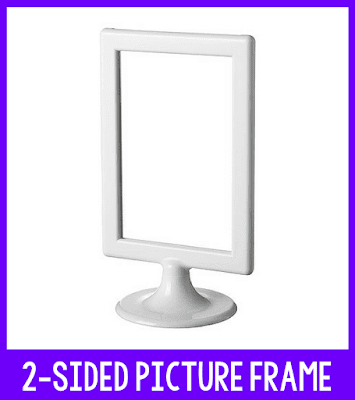
One simple solution for keeping anchor charts easily accessible to students all year is to take pictures of your anchor charts. This is a huge help since pictures obviously take up a lot less space! Think about a large poster compared to a 5x7 picture. I found this 2 sided picture frame from Ikea, which has worked perfectly as a display!
An Easy Way to Save Your Anchor Charts - The Reading Roundup
Click to purchase the frame.


It was so simple to turn this 2-sided picture frame into an anchor chart display! 
  1.  Remove the paper and plastic from the inside of the frame. 
  2.  Print the anchor chart pictures and whole punch the top.
  3.  Add binder rings to attach the pictures to the frame.
EASY!!
An Easy Way to Save Your Anchor Charts - The Reading Roundup

Keeping Anchor Charts Accessible All Year

These anchor chart displays are perfect to keep at your guided reading table as a quick reference. If your students sit at tables or groups of desks for independent work, you may even want to make an anchor chart display for each group. This makes it easy for them to refer to the anchor charts independently when needed.

How do you display anchor charts in your classroom? How do you provide access to the anchor charts all year for your students? Share your tips in the comments below!


Want to Pin this for later?

An Easy Way to Save Your Anchor Charts - The Reading Roundup


The Ultimate Tool for Organizing your Classroom Library

Classroom Booksource - The Ultimate Tool for Organizing Your Classroom Library - The Reading Roundup

Classroom Booksource is a game changer for your classroom library organization! 


Do your students or colleagues borrow books from you but the books never seem to make it back? Do you buy duplicates of books because you don't remember what you already have or can't find books when you need them? I definitely struggled with these frustrations in the past, but Classroom Booksource has been extremely beneficial in helping me to organize my classroom library!


I want to show you some of the valuable features of Classroom Booksource to help you with your classroom library organization!


Teacher Tools on Classroom Booksource

Classroom Booksource login for classroom library organization by The Reading Roundup
When you login to Classroom Booksource, you have the option to view it as a teacher or a student. I'll first show you the features for teachers.


Classroom Booksource dashboard for classroom library organization by The Reading Roundup
When teachers login, they will see this screen. I love that it allows me to quickly see how many books are checked out! If I click on the information, it will provide more details such as who has books checked out and which books they have.

Classroom Booksource reports for classroom library organization by The Reading Roundup
Classroom Booksource provides reports that allow you to see things such as the book distribution by reading level or the percentage of nonfiction versus fiction books in your library. This feature has been very beneficial in helping me identify the types of books I already have plenty of in my classroom library and which types I'm currently lacking.


Adding Books to your Classroom Library

Classroom Booksource book list for classroom library organization by The Reading Roundup
You can add books to your classroom library two ways: scanning the barcodes using the app or using the ISBN number. Most books will auto-populate with the cover image, title, author, and reading level. This is a HUGE time saver and extremely helpful with organization. There is an edit button and option to add a cover image if that information does not auto-populate. 

When finding a reading level, I love using Scholastic Book Wizard. You just type in the book you're looking for and one of the options it shows will be the guided reading level. There are some books that do not have it listed, but I've been able to find the reading level for 95% of my books so far.


Classroom Booksource book locations for classroom library organization by The Reading Roundup
Once you've added your books, you can further organize them under the tab titled: Book Quantities, Locations, and Conditions. This allows you to indicate the number of quantities of each book and the location. The quantity will automatically update if you scan each book separately or you can just select the option to add a book. It will assign a COPY ID of each individual copy, but I personally don't need to be that specific about labeling my books. Another option I haven't used is the ability to identify the condition of the book. These are both useful options to have, but just not necessary for me. 

You can also select where each book is located by setting up library locations. You can choose whatever locations work for your library. You can organize it by genre, topics, author, or however else you have your classroom library organized. Since I work with students in multiple grade levels, I simply organized mine by location on my bookshelf (shelf, bin). 
The Reading Roundup - Classroom library


Student Tools on Classroom Booksource

Classroom Booksource login for classroom library organization by The Reading Roundup
Classroom Booksource makes it so easy for students to browse, loan, and return books! When students log in, they are first shown a screen to select their name. 


Classroom Booksource student login for classroom library organization by The Reading Roundup
They are then given an option to checkout or return books. When they choose to checkout books, they can easily browse or search through the books in your classroom library. If they click on the book,they can see additional information including the location. This makes it easier to find the actual book in your library. To check out the book, all they have to do is select the green Check Out Book box. 


When students return the book, they have the option to write a review and provide a rating. This is a great way for me to get a better idea of the types of books students are interested in so that I can recommend similar titles. 


Using the Classroom Booksource App

The Classroom Booksource APP has made it SUPER EASY to organize my classroom library. To add the books, you just simply scan the barcode and select add to library. That's it!

It is just as easy to check out books to students. You select their name, scan the book's barcode, and select checkout. Students can return the books to you just by scanning the barcode as well!


See Classroom Booksource in Action

I created a video that shows all of these features in action. Check it out below! 

What tools or strategies have you found beneficial in organizing your classroom library? Share them in the comments below!


Want to Pin this for Later?

Classroom Booksource - The Ultimate Tool for Organizing Your Classroom Library Pin - The Reading Roundup